Oct 30, 2026
How to Automate Insurance Verification Requests in Salesforce
Many healthcare teams keep patient records in Salesforce Health Cloud but start insurance verification somewhere else. That means re-keying identifiers, switching applications, and discovering missing data only at submission. We built a guided Salesforce workflow that starts a Verification of Benefits (VOB) request from the patient record with one button. It pulls the EHR Patient ID and NPI, blocks the request if either is missing, asks staff to confirm the details, sends the request to an external verification service, and shows whether it was accepted.
Before a patient’s first appointment, someone has to confirm that their insurance plan covers the planned treatment. For intake coordinators, that check is routine. It is also repetitive, and it gets slower when the data needed to start it lives in one system and the request has to be submitted from another.
This article walks through how we approached insurance verification automation for a healthcare organization running on Salesforce: the problem, the workflow we designed, the decisions behind it, and what teams should measure if they build something similar.
Key takeaways
- Start insurance verification from the system where patient data already lives to remove re-keying and app switching.
- Validate mandatory fields such as the EHR Patient ID and NPI before calling any external service.
- Keep a staff confirmation step: presence checks catch blanks, people catch wrong values.
- Always show the submission result so staff know whether to follow up.
- Measure submission time, error rate, and manual effort before and after launch.
What is a Verification of Benefits (VOB) request?
A Verification of Benefits (VOB) request asks an insurance verification service or payer to confirm whether a patient’s plan covers a specific treatment or appointment type. It goes further than a basic eligibility check, which only confirms that a plan is active.
Two identifiers matter for the request in this project:
EHR Patient ID: the identifier for the patient in the Electronic Health Record (EHR) system, used to match the patient across systems.
NPI (National Provider Identifier): the unique 10-digit identifier assigned to US healthcare providers, used to identify the provider tied to the service.
If either value is missing or wrong, the request fails or needs to be corrected and resubmitted.
The challenge: patient data in Salesforce, verification requests somewhere else
In this organization, patient information was maintained in Salesforce using Person Accounts. VOB requests, however, were started through a separate external process. Every request meant moving information from one place to the other by hand.
That gap created three recurring problems.
Repetitive manual work
Staff had to retrieve details that already existed in the Salesforce record and use them to start a request elsewhere. The data was available. The work came from carrying it across.
Constant switching between systems
A coordinator reviewing a patient in Salesforce had to open another application to initiate verification. Each switch interrupted the task and added steps to a routine job.
Missing information discovered too late
A VOB request depends on accurate patient and provider data. If the EHR Patient ID or NPI was missing, staff often found out while preparing or submitting the request. They then had to return to the record, fix the gap, and start again.
Consider a coordinator preparing for an intake appointment. They open the patient record, start the verification process in a separate tool, and only then notice the EHR identifier is blank. The fix is simple. The lost time repeats across every patient with the same gap.
Why manual VOB requests become an operational problem
One slow request is a minor annoyance. The problem is volume.
Administrative workload grows with patient volume. Each new patient adds the same manual steps, so more requests mean more staff time spent on data transfer rather than patient coordination.
Manual transfer invites errors. Copying identifiers between applications creates room for a wrong digit or a missed field, and each error means rework.
Processes drift between people. When a task depends on manual steps, employees complete it in different ways. That makes training harder and ties the process to individual knowledge.
The cost scales with growth. A manual process that works at low volume becomes a bottleneck as the organization serves more patients.
The solution: a guided VOB request workflow inside Salesforce
Instead of asking staff to coordinate verification across applications, we moved the starting point into Salesforce, where the patient data already lived. The workflow combines four elements: automatic data retrieval, required-field validation, staff confirmation, and integration with an external verification service.
| Component | What it does |
|---|---|
| Request VOB button | Adds a single starting point on the Salesforce patient record (Person Account) |
| Data retrieval | Pulls the EHR Patient ID and NPI from the existing record |
| Required-field validation | Stops the request and tells staff what is missing if a mandatory value is blank |
| Staff confirmation | Shows the patient details and requires staff to confirm they are correct |
| External integration | Sends the patient identifier, provider information, and appointment type to the verification service |
| Submission feedback | Displays a success or error message based on the service’s response |
How the Salesforce VOB workflow runs, step by step
- Start from the patient record. A staff member opens the patient’s Salesforce record and clicks Request VOB.
- Retrieve required data. Salesforce reads the EHR Patient ID and NPI from the record, so nothing is retyped.
- Check mandatory fields. If the EHR Patient ID or required NPI is missing, the workflow shows a message explaining what needs to be completed. The request is not sent.
- Confirm the details. When the data is present, the workflow displays the patient details. Staff must confirm they are correct before continuing.
- Send the request. Salesforce sends the patient identifier, provider information, and appointment type to the external insurance verification service.
- Show the result. Salesforce receives the service’s response and shows a success message if the request was accepted, or an error message if it failed.
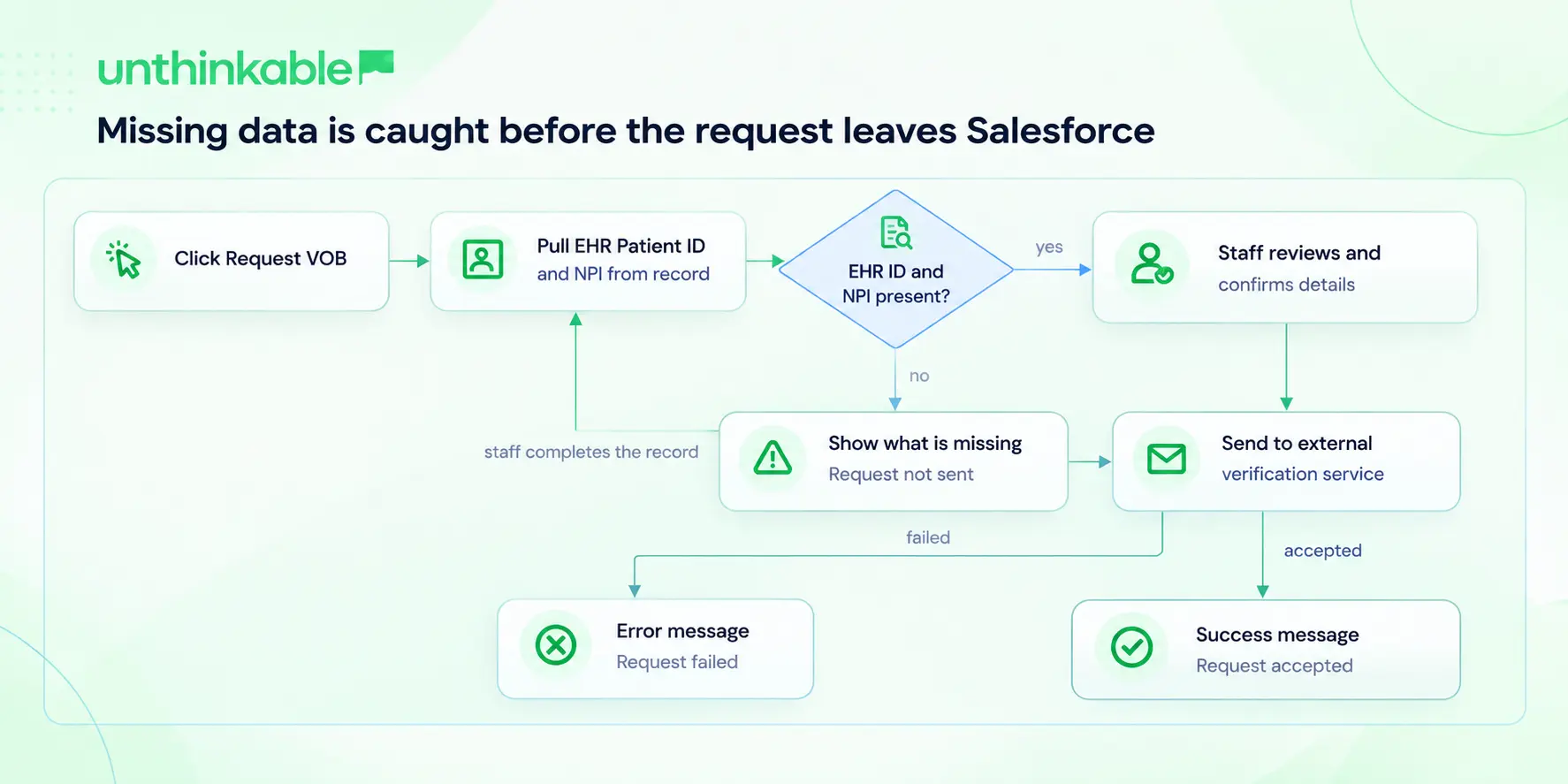
A missing EHR Patient ID or NPI stops the request inside Salesforce. Only complete, staff-confirmed requests reach the verification service.
Key design decisions and trade-offs
Start where the data already lives
The patient record was already the source of truth for the identifiers the request needed. Launching the request from that record removed the copy step entirely and kept the request tied to the data maintained in Salesforce.
Validate before calling the external service
Checking mandatory fields before the integration runs moves error discovery to the earliest, cheapest point. A blank EHR Patient ID is caught in Salesforce with a clear message, not after a failed submission. Note the scope: the check confirms required values are present. It does not confirm that a present value is correct, which is why the next step exists.
Keep a human in the loop
Full automation was possible, but the workflow deliberately asks staff to review and confirm patient details before submission. It adds one action per request. In exchange, it gives staff a chance to catch a wrong record or an outdated value before it reaches the verification service.
Make the outcome visible
Without a returned status, staff would not know whether a request went through. Showing the service’s response as a success or error message tells them immediately whether they need to act.
What changed for the healthcare team
The organization has not yet measured exact time savings, so the outcomes below describe operational changes rather than percentages.
| Area | Before | After |
|---|---|---|
| Data entry | Identifiers retrieved and re-entered by hand | Pulled automatically from the Salesforce record |
| Starting a request | Separate external process | One button on the patient record |
| Missing data | Found during preparation or submission | Flagged before the request is sent |
| Process consistency | Varied by employee | Same validation, confirmation, and submission sequence for everyone |
| Submission status | Uncertain | Success or error shown in Salesforce |
With fewer repetitive steps, staff can spend more of their time on patient coordination, resolving exceptions, and appointment preparation.
How to measure the impact of insurance verification automation
If you build a similar workflow, set a baseline before launch so the business case rests on data. Useful measures include:
- Request submission time: minutes from opening the record to a submitted request.
- Submission error rate: share of requests that fail or need resubmission.
- Manual effort: staff time spent preparing verification requests per day or week.
Compare these before and after automation to see the real effect and to find the next workflow worth simplifying.
Where teams can take this next
This project automated how verification requests are started. Many organizations later look at what happens after submission: bringing coverage details back into the record, checking procedure-level coverage, or connecting verification to the wider revenue cycle. Approaches such as real-time eligibility verification software built on X12 270/271 transactions address that next stage.
Conclusion
Manual VOB requests add administrative work, create avoidable errors, and complicate appointment preparation. Moving the request into the patient record, with validation and confirmation built in, turns a scattered task into a consistent workflow that staff can complete in a few actions.
The same pattern applies to other administrative steps that depend on moving data between Salesforce and external healthcare systems. If your team is weighing similar Salesforce automation for healthcare operations, start by mapping where staff copy data between systems today. Those handoffs are usually the best candidates for healthcare system integration.
About Author