Oct 30, 2026
How to Make a Slow Shopping Cart Feel Faster Without a Backend Overhaul
A legacy ecommerce backend made our client’s cart slower as more items were added, and stakeholders flagged it just before launch. Re-architecting the backend would have needed more R&D time than the launch allowed. Instead, we improved perceived performance on the frontend. The app loads cart data in the background at predictable moments, shows the cart instantly from that ready data, refreshes it quietly, and uses AbortController so only the latest response updates the screen. No backend code changed. The cart cleared stakeholder review, users responded well after launch, and the app now contributes about 40% of the business’s total revenue.
Most performance work starts on the server: profile the slow endpoint, fix the query, cache what you can. That is the right instinct, and on a stable codebase with time to spare it is usually the right plan. Our situation had neither. This is how we handled a slow cart on a legacy backend with a launch date that would not move, and what we learned about the difference between being fast and feeling fast.
Key takeaways
- Perceived performance is a real lever. Users judge speed by how quickly the screen responds, not by server response time.
- Find the predictable moments. Opening the cart and adding items are natural points to load data silently.
- Render first, refresh after. Stale-while-revalidate gives an instant screen while keeping the backend as the source of truth.
- Guard against race conditions. AbortController ensures only the latest cart request updates the screen.
- Not every problem needs an overhaul. Understanding user behavior and making a few targeted changes can unblock a launch.
- Plan the backend work anyway. A frontend fix hides latency; it does not remove it.
The problem: a cart that got slower as it filled up
We inherited the project’s legacy backend and spent the first phase stabilizing it until the product was in presentable shape. Then, close to launch, leadership and stakeholders started reporting that the cart felt heavy, laggy, and slow.
The pattern was clear: the more items in the cart, the longer the cart took to load. This pattern shows up on most commerce platforms. Cart and checkout pages are personal to each shopper, so they cannot rely on full-page caching the way product and category pages can, and the work behind them tends to grow with what is in the cart.
For a team running custom ecommerce platforms, a slow cart is not a cosmetic issue. The cart sits right before checkout, so any lag there is felt at the moment a shopper is deciding to buy.
Why a backend overhaul was not the right move before launch
We could fix the backend properly. Bringing cart load time under 200ms on the server would mean mapping every moving part behind the cart, optimizing each one, and re-testing a system we had only just stabilized.
That is real R&D work, and it does not compress well. Rushing it into the final days before launch would have traded a slow cart for an unpredictable one. We needed a change that was short, low-risk, and effective. This is the classic patch-or-rebuild question, and the hidden costs of technical debt are exactly why it deserves a deliberate answer rather than a reflex.
Does the cart need to be fast, or feel fast?
The question that unlocked the solution was simple: does the cart need to be fast, or does it need to feel fast?
Users never see the backend. They see the gap between tapping the cart and getting a usable screen. That gap is what perceived performance measures: how fast a product feels to the person using it, which depends on how quickly the interface responds, not only on how quickly the server answers.
When we studied other apps, this turned out to be a standard problem with a standard answer. Many apps that feel instant are not instant behind the scenes. They respond to the user immediately and do the slow work out of sight. Commerce platforms now build this idea in; Shopify’s Hydrogen framework, for example, ships an optimistic cart hook so cart actions render before the server confirms them.
So the goal changed. We did not need a 200ms backend before launch. We needed a cart screen that appeared as soon as the user asked for it, with correct data.
How we made the cart feel instant
The catch is that showing the cart requires cart data, and cart data comes from the slow backend. So the fix was about timing: fetch the data before the user asks for it, and never make them wait for it on screen. The approach had three parts.
1. Load cart data at moments the user will not notice
We identified the points in the shopping flow where loading the cart silently would be natural, and fetched cart data in the background at each one.
| Trigger | What happens in the background |
|---|---|
| User opens the cart for the first time | Cart data is loaded and kept ready for every later open |
| User adds an item to the cart | Cart data is reloaded so the next open reflects the new item |
| Any other cart operation | Cart data is reloaded behind the screen |
By the time a user opens the cart, the data they need is usually already on the device.
2. Show ready data first, then refresh in the background
When the user opens the cart, the app renders it immediately from the data it already holds. At the same time, it requests a fresh copy from the backend and updates the screen when that copy arrives.
This is a well-known pattern called stale-while-revalidate: serve the last known data instantly, then revalidate it against the source of truth. The user gets an immediate screen, and the backend still has the final word.
3. Keep only the latest response with AbortController
Background loading creates a new risk. If a shopper adds three items quickly, the app fires three cart requests. On a slow backend those responses can arrive out of order, and an older response could overwrite newer cart state.
We used AbortController, a standard browser API that works with the Fetch API, to prevent this. Each new cart request cancels the one before it, so only the most recent request resolves and updates the cart. The screen always reflects the latest state the user created, not whichever response happened to arrive last.
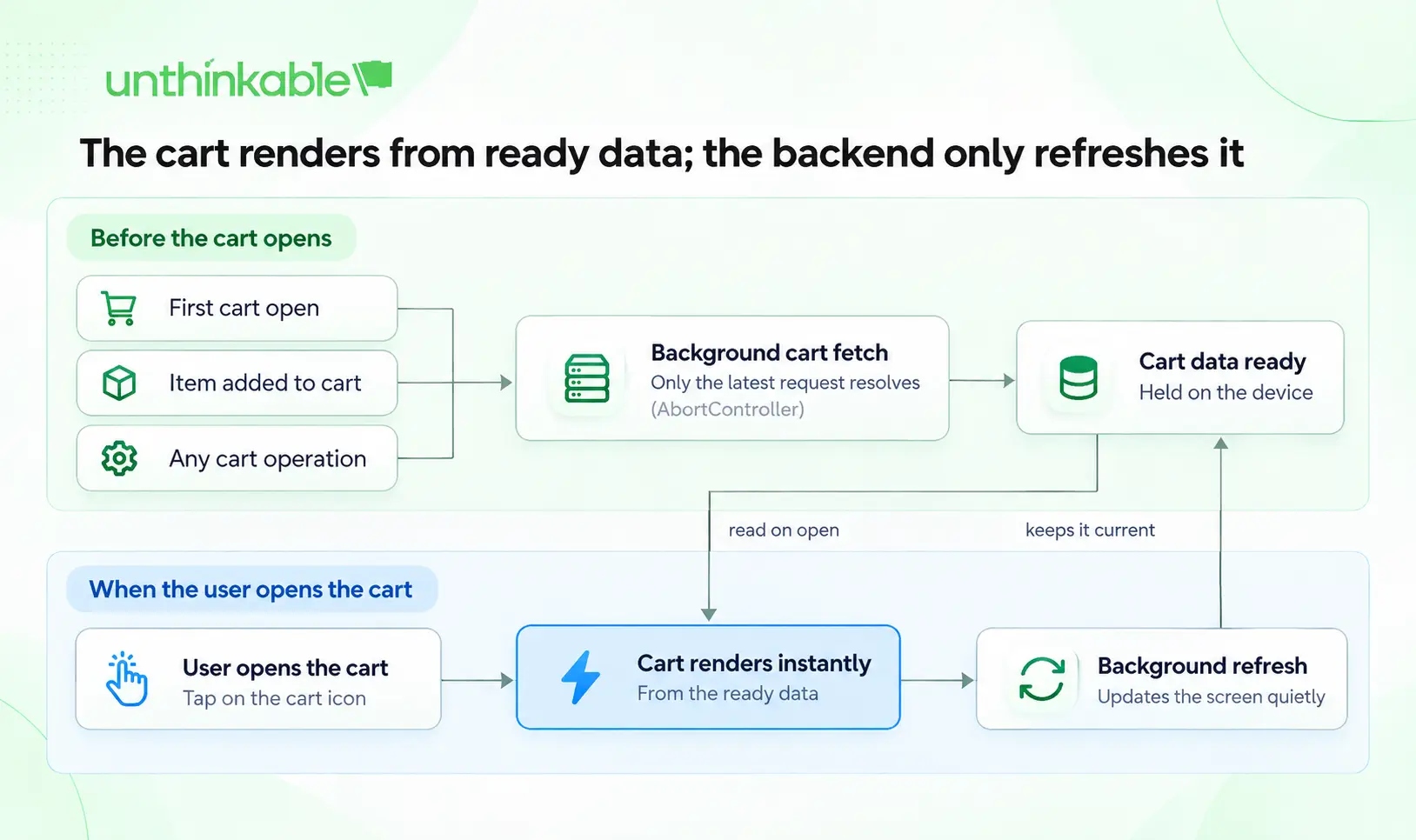
cart data flow · 3 triggers, instant render, background refresh
Cart data is fetched in the background at each trigger, so opening the cart reads ready data while a fresh copy loads behind it.
Key technical decisions and trade-offs
Every choice here traded something. These are the ones that matter most if you are considering the same approach.
| Decision | Why we made it | Trade-off to manage |
|---|---|---|
| Change only the frontend | Fit the launch window without destabilizing a backend we had just stabilized | Backend slowness is hidden from users, not removed |
| Preload at predictable cart moments | Data is ready before the user asks for it | More background requests reach an already slow backend |
| Show ready data first, refresh after | The cart appears instantly | Data can be briefly out of date until the refresh lands |
| Cancel superseded requests | Older responses cannot overwrite newer cart state | Cancelling stops the app from waiting; the server may still finish the work |
If you adopt this pattern, two guardrails are worth planning for. First, keep the backend as the source of truth at checkout, so final prices, stock and promotions are confirmed server-side before payment. Second, apply request cancellation to reads, such as fetching the cart, rather than to writes like adding or removing items, since aborting a write on the client does not undo it on the server. A sound caching strategy and separation of concerns make both easier.
What changed after launch
The cart now opened instantly with pre-loaded data and updated itself quietly in the background. Stakeholders who had flagged the cart approved it, and the response from users after launch was strongly positive.
The app, which had been struggling to win stakeholder approval before launch, now contributes about 40% of the business’s total revenue.
When this approach fits, and when it does not
Perceived-performance fixes work best when:
- The backend is slow but correct, so the data is worth showing once it arrives
- User actions are predictable enough to preload for, as cart opens and add-to-cart are
- A short deadline rules out deep backend changes
- The data can tolerate being a moment out of date before it refreshes
They are the wrong tool when the backend is unreliable rather than slow, when slowness affects most of the product rather than a few screens, or when users must see exact real-time values on screen. In those cases, the real fix is structural: modernizing the legacy application or a targeted re-architecture of the slow components.
Even when it fits, treat a frontend fix like this as a bridge. It buys time and protects the user experience while the backend work is planned properly.
Conclusion
The lesson from this project applies well beyond one platform or one cart. Performance is not only about making systems faster; sometimes it is about making the experience feel faster, and choosing the right moment to do the deeper work.
If your team is weighing a frontend fix against a backend rebuild, start by mapping where users actually wait and which of those moments are predictable. If you want a second opinion on that trade-off, our ecommerce app development team works on both sides of it, from the screens shoppers see to the platforms behind them.
Frequently asked questions
What is perceived performance?
Perceived performance is how fast a product feels to the person using it. It depends on how quickly the interface responds to an action, not only on how long the server takes to answer. A screen that appears instantly and updates a moment later usually feels faster than one that waits for complete data.
Why does a shopping cart slow down as more items are added?
Cart pages are personal to each shopper, so most commerce platforms cannot serve them from full-page cache the way they serve product pages. The work behind the cart, such as recalculating totals and applying price rules, tends to grow with the number of items, and extensions or customizations on a legacy store can add more. Profiling the cart request shows which step is responsible on a given store.
Can you make a slow cart feel faster without changing the backend?
Yes, when the backend is slow but correct. Load cart data in the background at predictable moments, such as opening the cart or adding an item, then render the cart from that ready data and refresh it quietly. The backend latency is still there; users simply stop waiting on it.
What does AbortController do in this setup?
AbortController is a standard browser API that cancels an in-flight fetch request. When several cart requests fire in quick succession, each new request cancels the previous one, so an older response cannot arrive late and overwrite newer cart data. It is best applied to reads, since cancelling a write on the client does not undo it on the server.
When should you re-architect instead of improving perceived performance?
Re-architect when the backend is unreliable rather than slow, when slowness affects most of the product rather than a few screens, or when users need exact real-time values on screen. Perceived-performance fixes work best as a bridge that protects the experience while deeper backend work is planned.
About Author