Oct 16, 2026
HL7 Integration in Healthcare Systems: A Complete Guide
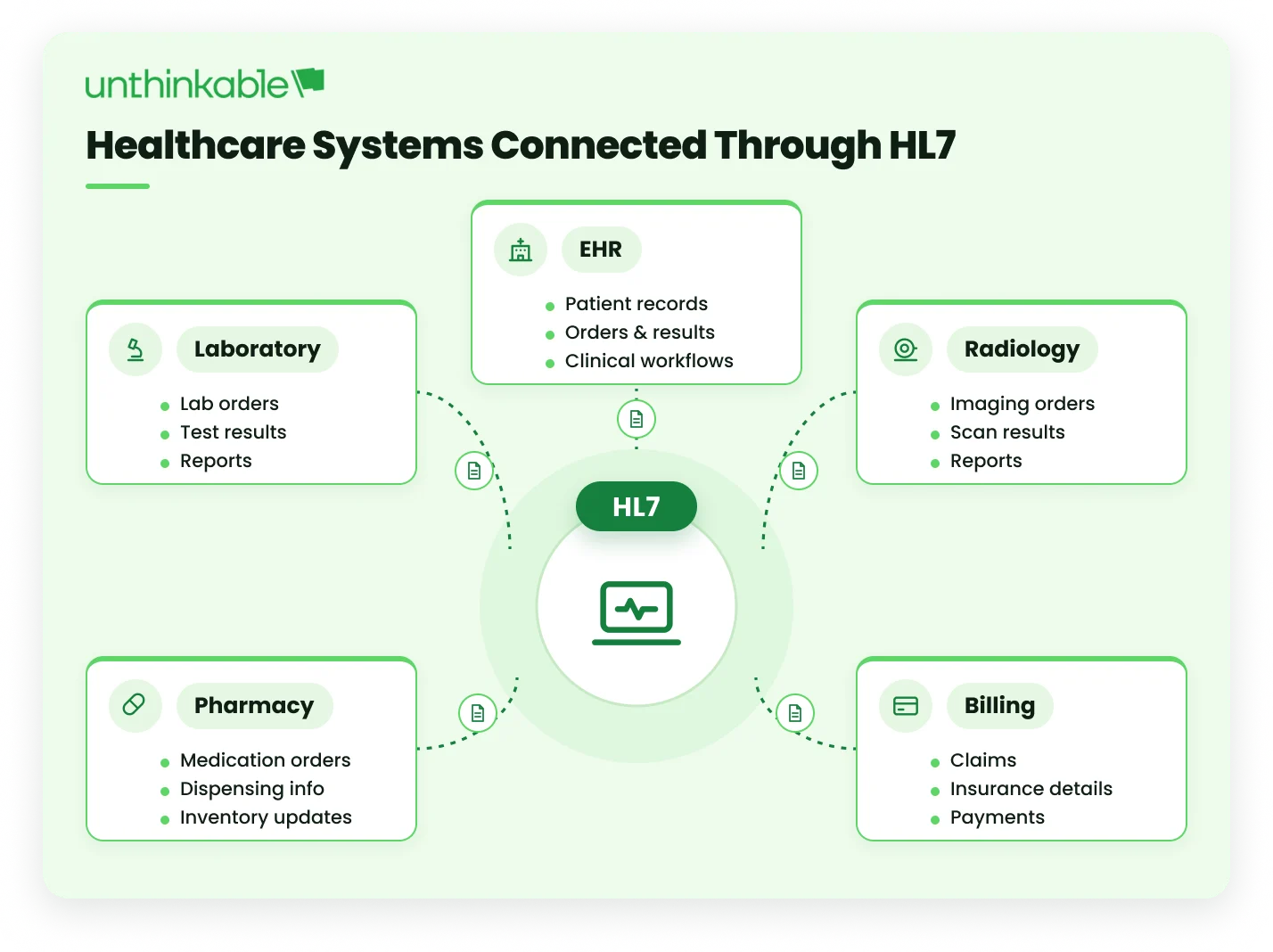
Healthcare organizations rely on EHRs, laboratory information systems, radiology, pharmacy, billing, and other applications to exchange patient and clinical data. HL7 integration in healthcare provides a standardized way for these systems to communicate, supporting healthcare interoperability and reducing the need for repetitive manual data entry.
The need for connected healthcare systems continues to grow. According to a February 2026 report from the U.S. Office of the National Coordinator for Health Information Technology (ONC), 7 in 10 U.S. hospitals used standards-based APIs, such as HL7 FHIR, to enable patients to access their health information in 2024. This highlights the importance of standards-based data exchange as healthcare organizations connect EHRs and other clinical systems.
While HL7 V2 remains widely used for message-based exchange between established healthcare systems, FHIR supports modern, API-based data exchange. Organizations may use either standard or both, depending on their existing systems, integration requirements, and modernization plans.
This guide explains 7 key steps for HL7 implementation, how HL7 integration works, and covers the factors to consider when choosing the right HL7 integration approach for healthcare systems.
What Is HL7 Integration in Healthcare Systems
HL7 (Health Level Seven) is a set of healthcare standards that helps different healthcare systems exchange health information. HL7 integration in healthcare connects systems such as EHRs, laboratory systems, radiology systems, and pharmacy applications so they can share patient and clinical data using these standards.
Healthcare organizations use many systems to manage patient records, medical orders, lab results, appointments, imaging, and other information. These systems may store and send data in different ways. HL7 integration helps them exchange this information without requiring staff to enter the same data into multiple systems.
Example: When a doctor orders a blood test in an EHR, the EHR can generate an HL7 message containing the patient’s details and test order. The configured interface sends this message to the laboratory information system (LIS), which interprets the information according to the agreed HL7 specifications. After the test is completed, the LIS can send the results back to the EHR using an appropriate HL7 message. This allows both systems to exchange patient and test information without requiring staff to enter the same data manually into each system.
An HL7-compliant interface can connect systems such as:
- Electronic Health Records (EHRs) and Electronic Medical Records (EMRs)
- Laboratory Information Systems (LIS)
- Radiology and imaging systems
- Pharmacy systems
- Medical devices
- Hospital and billing applications
The main goal of healthcare HL7 integration is to help different systems exchange information accurately and consistently. This supports healthcare interoperability and makes patient information available across connected systems when it is needed.
Why Is HL7 Important for Healthcare Data Interoperability?
A hospital can own the best EHR on the market and still deliver slower, less safe care if that EHR can’t see what the lab, the pharmacy, and the billing system already know. Interoperability isn’t a nice-to-have feature sitting on top of healthcare software; it decides whether the right information reaches a clinician in time to matter.
HL7 matters because it gives every system, regardless of vendor, a shared structure to send and receive that information. A lab system built by one company and an EHR built by another can still exchange a result correctly because both of the companies are speaking HL7.
This is also why HL7 and interoperability show up so often in healthcare regulation. The Cures Act Final Rule in the US, for instance, pushed certified EHR vendors to open up standards-based APIs so patient data could move more freely between systems instead of staying locked inside one vendor’s platform.
Here’s what strong HL7 integration actually changes on the ground:
- Patient safety: Lab results, medication lists, and allergy information reach the right chart without someone re-keying them, which cuts down on transcription errors.
- Clinical efficiency: Doctors and nurses spend less time switching between systems or chasing down a result over the phone.
- Care coordination: A patient referred from a clinic to a specialist, or discharged to a home-care provider, arrives with their history intact instead of starting from a blank file. This becomes particularly important for hospital-at-home programs, where information needs to move between hospital and home-based care teams.
- Regulatory compliance: Many healthcare compliance programs now expect systems to support standards-based data exchange, not isolated databases.
- Lower operating cost: Less manual data entry means fewer staff hours spent on repetitive admin work that adds no clinical value.
7 Steps to Integrate HL7 in Healthcare Apps
Implementing HL7 integration requires more than connecting two healthcare systems. Teams need to understand the existing systems, define the data exchange requirements, select the appropriate HL7 standard and message types, design the integration architecture, map the data, and establish rules for validation and error handling. Testing and post-launch monitoring are equally important because healthcare interfaces need to remain reliable as connected systems and workflows change.
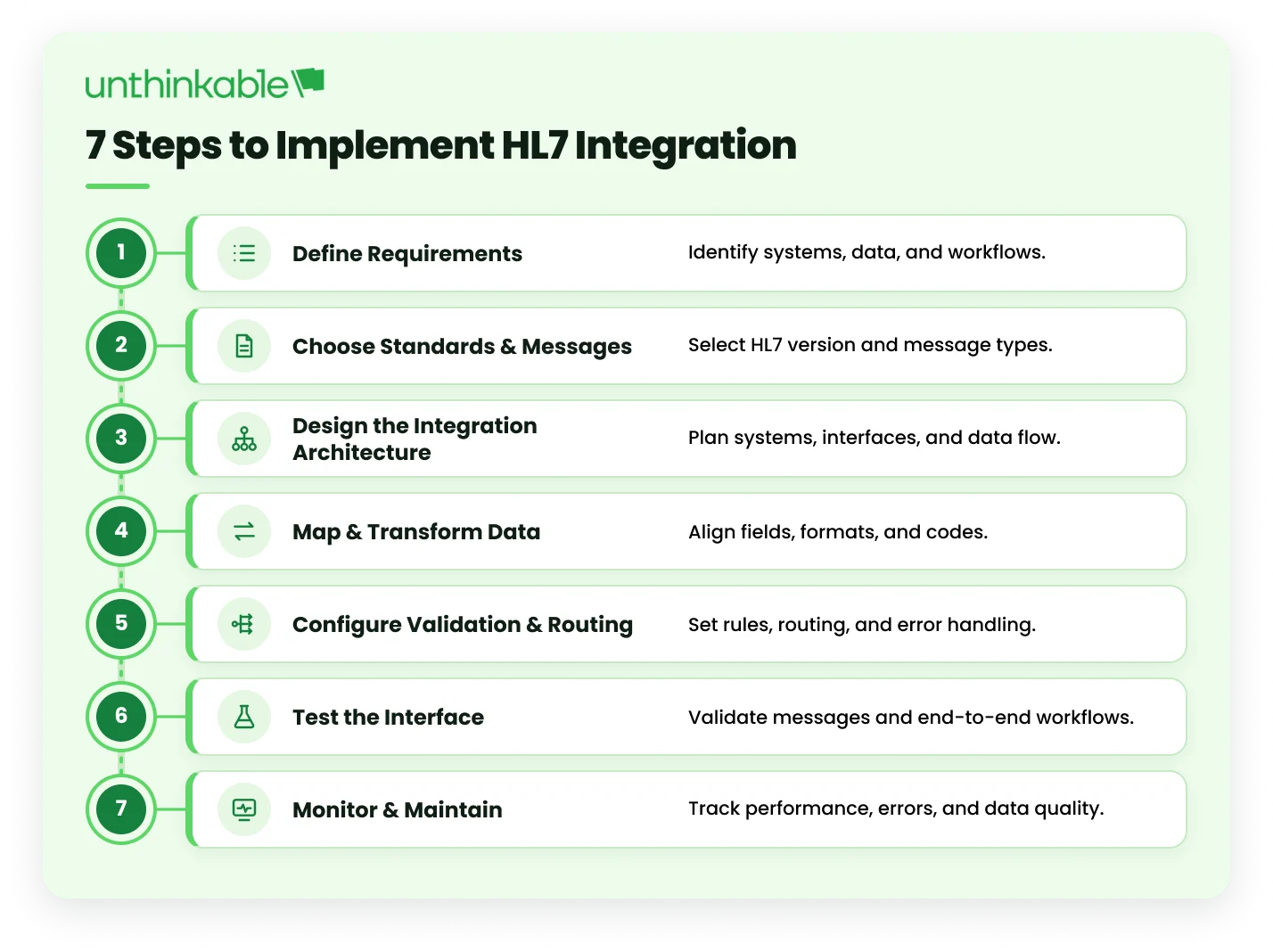
A practical implementation can be approached through the following 7 steps:
1. Define the Integration Requirements
Before building an HL7 interface, define what needs to be exchanged, which systems are involved, and how the data should move between them. Clear requirements help the integration team build the interface around the actual healthcare workflow.
Why It Matters: Clear requirements help prevent mapping errors, missed data fields, and rework during development and testing.
Practical Guidance
- Identify source and destination systems.
- Define the data to be exchanged.
- Confirm HL7 version and message types.
- Define message triggers and exchange direction.
- Document required fields and acknowledgment needs.
Example: For an EHR-to-LIS integration, the requirements may define that the EHR sends laboratory orders to the LIS and the LIS sends completed results back to the EHR. The team can then specify the required data, message types, exchange direction, and acknowledgment requirements before development begins.
Pro Tip: Review the receiving system’s interface specification and sample messages before development to confirm messaging requirements.
Also Read: Developing a Custom Practice Management System for a Multi-Clinic Healthcare Network
2. Choose the HL7 Standard and Message Types
Select the HL7 standard and message types that match the systems, data, and workflows being integrated. This includes deciding whether to use HL7 V2, FHIR, or both, and identifying the specific messages or resources needed for each data exchange. The choice should also consider what the connected systems already support and how the integration may evolve.
Why It Matters: Choosing the right standard and message types ensures that systems exchange the required information in a format they can process correctly.
Practical Guidance
- Confirm whether the integration requires HL7 V2, FHIR, or both.
- Identify the message types needed for each workflow.
- Confirm the required segments and fields.
- Check the implementation guide or interface specification.
- Consider future API or interoperability requirements.
Example: For an EHR-to-LIS integration, ORM can be used for laboratory orders and ORU for laboratory results, depending on the receiving system’s implementation requirements. HL7’s Version 2.5.1 Laboratory Results Interface guides laboratory result exchange.
Pro Tip: Choose the standard based on the existing systems and integration needs rather than adopting a newer standard simply because it is newer.
3. Define the Integration Architecture
Define how healthcare systems will connect, exchange data, and handle messages throughout the integration. The architecture may use direct system-to-system connections, an interface engine, APIs, or a combination of these approaches.
Where multiple healthcare applications need to communicate, microservices best practices can also help teams structure independent services and reduce tight coupling between components.
Why It Matters: A suitable architecture makes the integration easier to manage, scale, monitor, and adapt as more healthcare systems or data flows are added.
Practical Guidance
- Identify the systems and connections required.
- Decide between point-to-point, interface engine, API-based, or hybrid integration.
- Define where message transformation and validation will happen.
- Plan routing, error handling, and monitoring.
- Consider future systems and integration requirements.
Example: For an EHR connected to multiple systems such as an LIS, pharmacy, and radiology system, an interface engine can act as a central integration layer to receive, transform, route, and monitor HL7 messages.
Pro Tip: Avoid designing a separate connection for every system when a shared integration layer can simplify routing, transformation, and monitoring.
4. Map and Transform Healthcare Data
Build the field-by-field mapping between the source and destination systems and make the required changes to codes, formats, and values so both systems interpret the data correctly.
Why It Matters: Different systems can represent the same healthcare information in different ways. Using consistent standards and clear mapping helps prevent data quality issues when information moves between systems.
Practical Guidance
- Map each source field to its destination field.
- Use standard code sets such as LOINC, SNOMED CT, and RxNorm where applicable.
- Reformat dates, units, and other values when required.
- Map fields that are structured differently across systems.
- Include billing and insurance fields when they are part of the data exchange, such as in patient billing systems.
Example: A laboratory system may use a different test code or date format than the EHR. The integration layer maps the test code and converts the date format before sending the message to the EHR.
Pro Tip: Create a field-level mapping document before development so each required data element has a defined source, destination, and transformation rule.
5. Configure Routing, Validation and Error Handling
Set up rules to determine where HL7 messages should go, verify that the data meets the required format and rules, and define what happens when a message cannot be processed.
Why It Matters: Proper routing and validation prevent incorrect or incomplete data from reaching the wrong system, while error handling ensures you can identify and address failed messages.
Practical Guidance
- Define routing rules based on message type or destination.
- Validate required fields, formats, and values.
- Log rejected and failed messages.
- Set up alerts for critical integration errors.
- Define retry and reprocessing procedures.
Example: If an HL7 message is missing a required field, the integration layer can reject or quarantine it, record the error, and alert the integration team for correction and reprocessing.
Pro Tip: Separate temporary connection failures from data errors so messages can be retried automatically where appropriate without repeatedly processing invalid data.
6. Test the HL7 Interface
Test the interface with realistic HL7 messages before connecting it to live patient data. This should include normal messages, invalid messages, and edge cases that could occur in real workflows.
Why It Matters: Testing helps catch message, mapping, and data-handling issues before they affect real patient records or clinical workflows.
Practical Guidance
- Test valid and invalid HL7 messages.
- Test missing, incorrect, and unusual data values.
- Test the complete flow between connected systems.
- Test ACKs, failures, and message reprocessing.
- Use a sandbox or test environment before production.
Example: From Our Engineering Experience
Our team built a custom EHR system for Acuity Eye Group, a US-based ophthalmology network operating across 60+ clinics, with 1,000+ eye-care practitioners and more than 100,000 appointments handled annually. The system needed to support patient records, appointments, billing, insurance, and other clinical workflows across the network. Testing therefore had to account for the range of workflows and users the EHR would support rather than relying on a small set of sample records before deployment.
For more details, you can read the EHR software development case study here.
Pro Tip: Test edge cases, not just successful messages. For example, a patient without a middle name or a laboratory result with an unusual unit of measure.

7. Monitor and Maintain the Integration
Keep track of the HL7 interface after it goes live and update it when connected systems, data requirements, or workflows change. This includes checking message flow, reviewing errors, and making sure the interface continues to work as expected as the connected systems evolve.
Why It Matters: An interface can continue to work technically while messages start failing because of system changes, new data requirements, or connectivity issues. Ongoing monitoring helps catch these problems early.
Practical Guidance
- Track message failures and processing delays.
- Monitor ACK errors and message queues.
- Review interface logs regularly.
- Update mappings when systems or requirements change.
- Test interfaces again after major system updates.
Example: From Our Engineering Experience
Our team worked with Shifo Foundation to modernize its health data infrastructure, supporting large-scale health data processing and reporting. The platform now delivers 99% accurate, WHO-approved data and has enabled 141,000+ automated follow-ups, highlighting why continuous monitoring, data quality checks, and ongoing infrastructure maintenance are essential as healthcare data volumes and requirements evolve.
Pro Tip: Monitor the integration as part of the regular system maintenance process rather than treating it as a one-time post-launch task.
How Does HL7 Integration Work?
HL7 integration works by moving healthcare data from one system to another in a structured format that both systems can understand. When an event such as a patient admission, lab order, or test result occurs, the source system generates an HL7 message. An interface engine or integration layer receives the message, reads and maps the data, applies validation and routing rules, and sends it to the destination system. The receiving system then processes the message and returns an acknowledgment to confirm whether it was accepted or rejected.
What Does an HL7 v2 Message Look Like
An HL7 v2 message is a block of plain text. Each line is called a segment, and each segment holds a group of related details such as patient information or order information.
The example below is a lab order sent from an EHR to a laboratory system:
MSH|^~\&|EHR|CITYHOSP|LIS|LABSYS|20261008101500||ORM^O01|MSG00012|P|2.5.1
PID|1||MRN123456^^^CITYHOSP^MR||DOE^JANE||19850412|F
ORC|NW|ORD789
OBR|1|ORD789||24323-8^Comprehensive metabolic panel^LN
Here is what each line carries:
- MSH (message header): tells the receiving system who sent the message, who should receive it, when it was created, what type of message it is (here, an order called ORM^O01), a unique message ID, and the HL7 version (2.5.1).
- PID (patient identification): holds the patient’s ID number, name, date of birth, and sex.
- ORC (common order): shows that this is a new order (NW) and gives the order number.
- OBR (observation request): names the test being requested. The code 24323-8 is a LOINC code, which is a standard code for lab tests.
The symbols between the values are separators. A pipe (|) separates fields, a caret (^) separates parts of a single field such as last name and first name, and the first line defines which symbols the message uses. Once you can read these four lines, you can read most HL7 v2 messages.
In a typical HL7 integration workflow, the process looks like this:
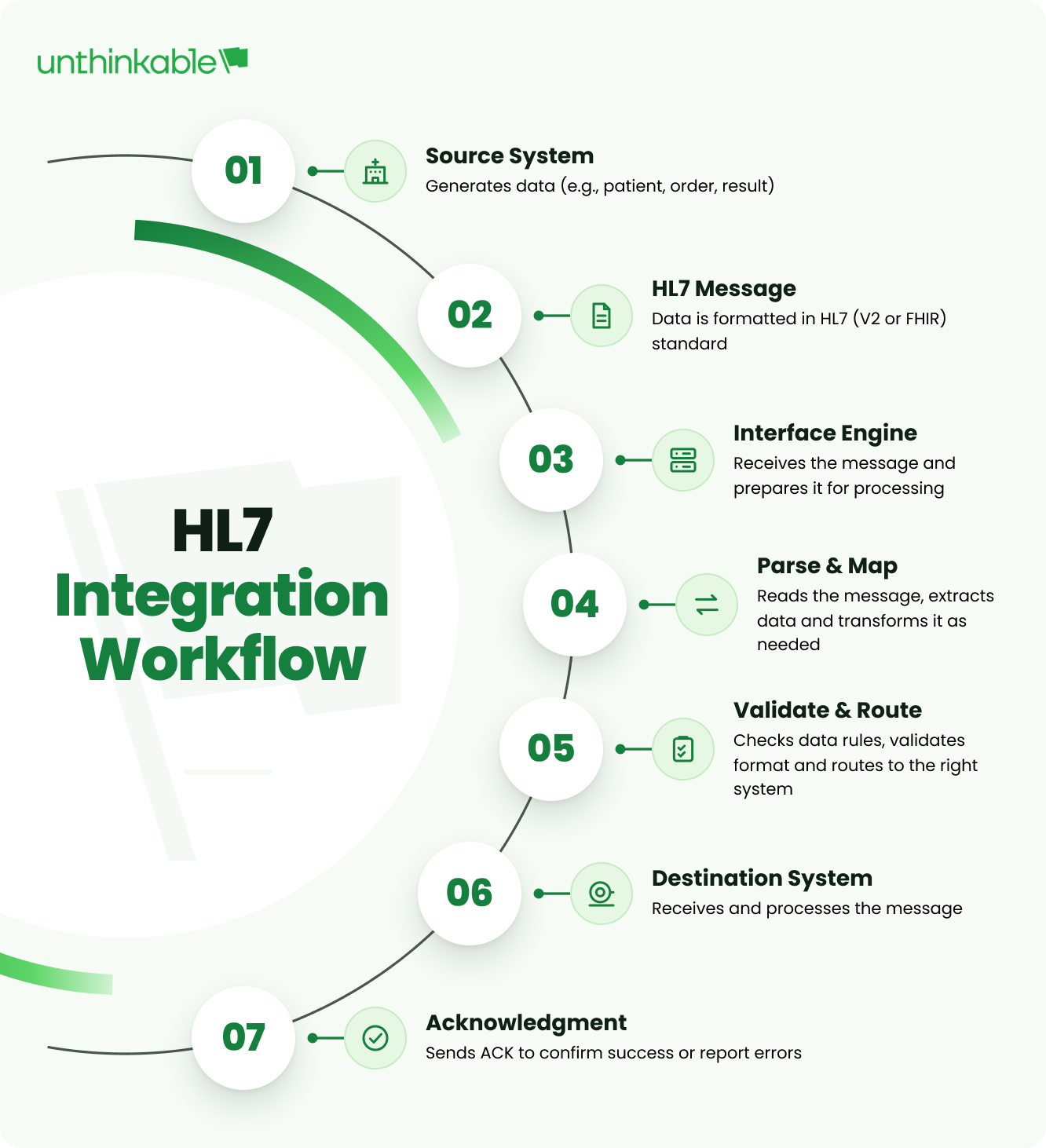
This process allows healthcare organizations to connect EHRs with systems such as laboratory, radiology, pharmacy, and other clinical applications without requiring every system to use the same internal data structure.
Here’s what happens, step by step, when one system sends patient data to another over HL7:
1. Identify the Source and Destination Systems
The first step is to identify where the healthcare data originates, where it needs to go, and what information needs to be exchanged. The source could be an EHR, LIS, RIS, pharmacy system, or medical device, while the destination could be another clinical application, data repository, or external healthcare platform.
Before setting up the interface, define:
- Data: What information needs to be exchanged, such as patient demographics, lab results, orders, or admission details
- Direction: Whether data moves one way or between both systems
- HL7 requirements: The HL7 version, message types, and fields supported by each system
- Communication: How frequently messages need to be exchanged and which transport method will be used
- Response: Whether the receiving system needs to return an acknowledgment
HL7 can connect systems from different vendors, but their implementations may have different requirements. Defining these details upfront gives the integration team a clear basis for the message mapping and processing that follows.
2. Generate the HL7 Message
Once the source and destination are defined, the source system generates an HL7 message based on the event that needs to be communicated.
- Trigger: An event such as a patient admission, lab order, or completed test generates the message.
- Message type: The system selects the appropriate HL7 message, such as ADT for patient movements, ORM for orders, or ORU for clinical results.
- Message structure: The message contains segments and fields that carry information such as patient details, orders, and results.
- -Required data: The message is populated with the fields expected by the receiving system and the agreed interface specification.
For example, when a laboratory test is ordered in an EHR, the system can generate an ORM message containing the patient and order information required by the LIS. The message is then passed to the integration layer for processing.
3. Receive and Parse the Message
The HL7 message is received by the interface engine or integration layer, which reads the message and breaks it into its individual components before the data can be processed.
- Receive: Accept the incoming HL7 message from the source system.
- Parse: Break the message into its segments, fields, and components.
- Interpret: Identify the message type and the information contained in each segment.
- Check: Confirm that the message has the expected structure before moving it to mapping and transformation.
This processing is particularly important when healthcare systems use different integration methods and data formats. ONC research shows that hospitals continue to use HL7 interfaces alongside APIs when exchanging data between EHRs and third-party systems.
4. Map and Transform the Data
The data now needs to be prepared for the destination system. Even when both systems use HL7, they may expect different field formats, values, or codes. This is where healthcare data mapping and transformation becomes important.
- Map: Match fields from the source message to the corresponding fields in the destination system.
- Transform: Convert data into the format the receiving system expects, such as dates, units, codes, or field values.
- Translate: Convert different codes or terminology when the source and destination use different representations.
- Apply rules: Add, remove, or restructure data when required by the destination system.
For example, a source system may send a laboratory test using one code or date format, while the receiving LIS expects another. The integration layer maps and transforms these values before sending the message.
5. Validate and Route the Message
Before the message is delivered, the integration layer checks that the data is complete, valid, and ready for the intended system.
- Validate: Check the message structure, required fields, data formats, and values against the interface rules.
- Apply rules: Verify that the data meets the business and destination-system requirements.
- Route: Determine where the message should go based on its type, content, or routing rules.
- Handle errors: Messages that fail validation can be rejected, logged, or moved to an error queue for review and reprocessing.
This step ensures that the right message reaches the right system with the data it expects.
6. Deliver the Data to the Destination System
Once the message passes validation and routing, the integration layer sends it to the intended destination system for processing.
- Transmit: Send the processed HL7 message through the configured communication channel.
- Receive: The destination system accepts the message and reads the required information.
- Process: The system uses the data to update the relevant patient record, order, result, or other workflow.
- Confirm: The integration layer tracks the delivery status so failed transmissions can be identified and handled.
7. Send an Acknowledgment
After receiving the message, the destination system sends an HL7 acknowledgment (ACK) to let the source system know whether the message was successfully processed.
- Accept: Confirms that the message was received and accepted.
- Error: Indicates that the message was received but could not be processed correctly.
- Reject: Indicates that the message was not accepted.
- Respond: The sending system can use the acknowledgment to confirm completion or trigger error handling and reprocessing when required.
This closes the HL7 message exchange and gives the sending system a clear status of the transaction.
Common HL7 Integration Challenges and How to Fix Them
HL7 provides a common standard for exchanging healthcare data, but it does not mean every system implements that standard in exactly the same way. Differences in HL7 versions, vendor-specific fields, patient identifiers, message formats, and interface documentation can cause problems even when two systems both support HL7.
The most common HL7 integration challenges include:
1. Vendor-Specific HL7 Fields
Healthcare vendors often add custom fields or Z-segments to standard HL7 messages to support their own workflows. A receiving system may not recognize these fields or may interpret them differently.
How to fix it: Review the vendor’s interface specification and sample messages before development. Identify which custom fields need to be mapped, transformed, ignored, or removed.
2. Different HL7 Versions
Two systems may support different HL7 V2 versions, such as 2.3 and 2.5.1. Differences in message structures, segments, and supported fields can cause messages to fail or data to be interpreted incorrectly.
How to fix it: Confirm the HL7 version supported by each system during the requirements stage. Where necessary, use the integration engine to transform messages between the formats expected by each system.
3. Duplicate or Mismatched Patient Records
Patient information may exist under different identifiers across an EHR, laboratory system, or other healthcare application. Without a reliable way to match records, the same patient can end up with multiple records or information attached to the wrong record.
How to fix it: Establish clear patient-matching rules and use a Master Patient Index (MPI) where appropriate. Patient identifiers and matching logic should be agreed upon before the interface goes live.
4. Character Encoding and Data Format Issues
Names, addresses, clinical notes, and other fields can contain accented characters or characters from different languages. If connected systems use incompatible character encoding, the information may appear incorrectly after transmission.
How to fix it: Agree on the character set supported by both systems and include multilingual and special-character data in interface testing.
5. Limited or Outdated Interface Documentation
Older healthcare systems do not always have complete or up-to-date interface documentation. The written specification may not fully describe what the system actually sends or expects.
How to fix it: Request the latest interface specification and collect real-world sample messages from the system. Compare the documentation with those messages before finalizing the mapping.
These challenges are why HL7 integration requires more than connecting two endpoints. Understanding the actual implementation of each system, documenting the mappings, testing realistic scenarios, and monitoring the interface after deployment are all essential to keeping healthcare data moving reliably.
How to Choose an HL7 Integration Approach
The right approach depends on the systems already in place, the type of information being exchanged, how those systems communicate, and what the organization expects to add or replace in the future.
These are the 5 areas worth evaluating before deciding how the integration should be built:
- Existing healthcare systems: Start with the systems that already run the workflow. An EHR may support HL7 V2 while a newer application may expose FHIR APIs, and a laboratory or imaging system may have its own interface requirements.
Understanding these capabilities first helps determine whether the integration should use existing interfaces, an integration layer, APIs, or a combination of them. - Integration complexity: Count more than just the number of systems. Consider how many workflows need to be connected, how many messages each system sends and receives, and whether the same data needs to move through several systems. A simple EHR-to-LIS connection may work with a focused interface, while a multi-system environment usually benefits from a central layer for routing, transformation, and monitoring.
- HL7 version and standards: Confirm what each connected system actually supports instead of choosing a standard in isolation. Existing systems may depend heavily on HL7 V2, while newer applications may require FHIR APIs. In some environments, both need to work together, which makes the integration strategy and mapping approach particularly important.
- Security and compliance: Healthcare data cannot be treated like ordinary application data. The architecture needs to account for secure transmission, authentication, access controls, audit trails, and appropriate handling of sensitive information. These requirements should be considered while designing the integration rather than added after the interfaces are already built.
- Scalability and Future Modernization: Consider what the integration will need to support later. Adding more hospitals, applications, APIs, or data sources can make point-to-point connections difficult to maintain. A structured integration layer can make it easier to expand the environment without rebuilding existing interfaces. This becomes particularly important as organizations modernize their custom health platforms and connect them with a growing range of healthcare systems and applications.
Getting these right from the start is usually what separates an HL7 integration that keeps working quietly for years from one that needs constant firefighting. It’s a big part of what we help healthcare teams think through at Unthinkable, alongside the actual engineering work of building and testing the interfaces themselves.
How AI Is Starting to Help With HL7 Integration?
HL7 integration still depends on careful interface design, clinical context, and human review. But some of the work involved in building and maintaining interfaces is repetitive, making it a practical area for AI-assisted workflows. These capabilities can also support broader healthcare applications, including AI in telemedicine, where timely access to patient and clinical data is important.
- Field mapping: Review sample HL7 messages and specifications to suggest matches between source and destination fields.
- Message and data checks: Flag missing fields, unexpected values, malformed messages, and recurring format issues.
- Interface troubleshooting: Analyze logs and group recurring errors to help teams identify problems faster.
- Test data generation: Create synthetic HL7 messages and edge cases for testing without using real patient data.
AI works best here as an engineering aid, not a replacement for interface expertise. Mapping decisions and validation rules still need review by people who understand the clinical workflow and the requirements of the connected systems. Healthcare teams should also keep protected health information out of public AI tools and use solutions with appropriate security, privacy, and contractual controls.
Conclusion
HL7 integration is ultimately about making healthcare data available where it is needed, when it is needed. Whether an organization is working with established HL7 V2 interfaces or introducing FHIR APIs, the objective is the same: connect the systems behind clinical and operational workflows so information can move without repeated manual entry.
A reliable integration depends on more than choosing the right standard. The architecture, field mapping, validation, error handling, testing, and monitoring all have a direct impact on how well the integration performs once it is in use. It is also important to design with future systems and modernization plans in mind, so today’s interfaces do not become tomorrow’s bottlenecks.
For healthcare organizations building or modernizing this kind of connectivity, Unthinkable’s EMR EHR software development team works on exactly this, connecting EHRs, labs, pharmacy, and billing systems so patient data moves the way it should, without the manual work in between.
About Author